导出并跟踪安全发现
使用已完成的 Codex Security 扫描作为两种不同交接流程的来源:
- 导出会创建可移植的 JSON、CSV 或 SARIF 文件。
- 跟踪发现会将选定的发现准备为 Linear、GitHub 或 Jira issue,或一个私有的 GitHub Security Advisory 草稿,检查重复项,并在写入前等待你的批准。
这些工作流不会更改已封存的扫描包。
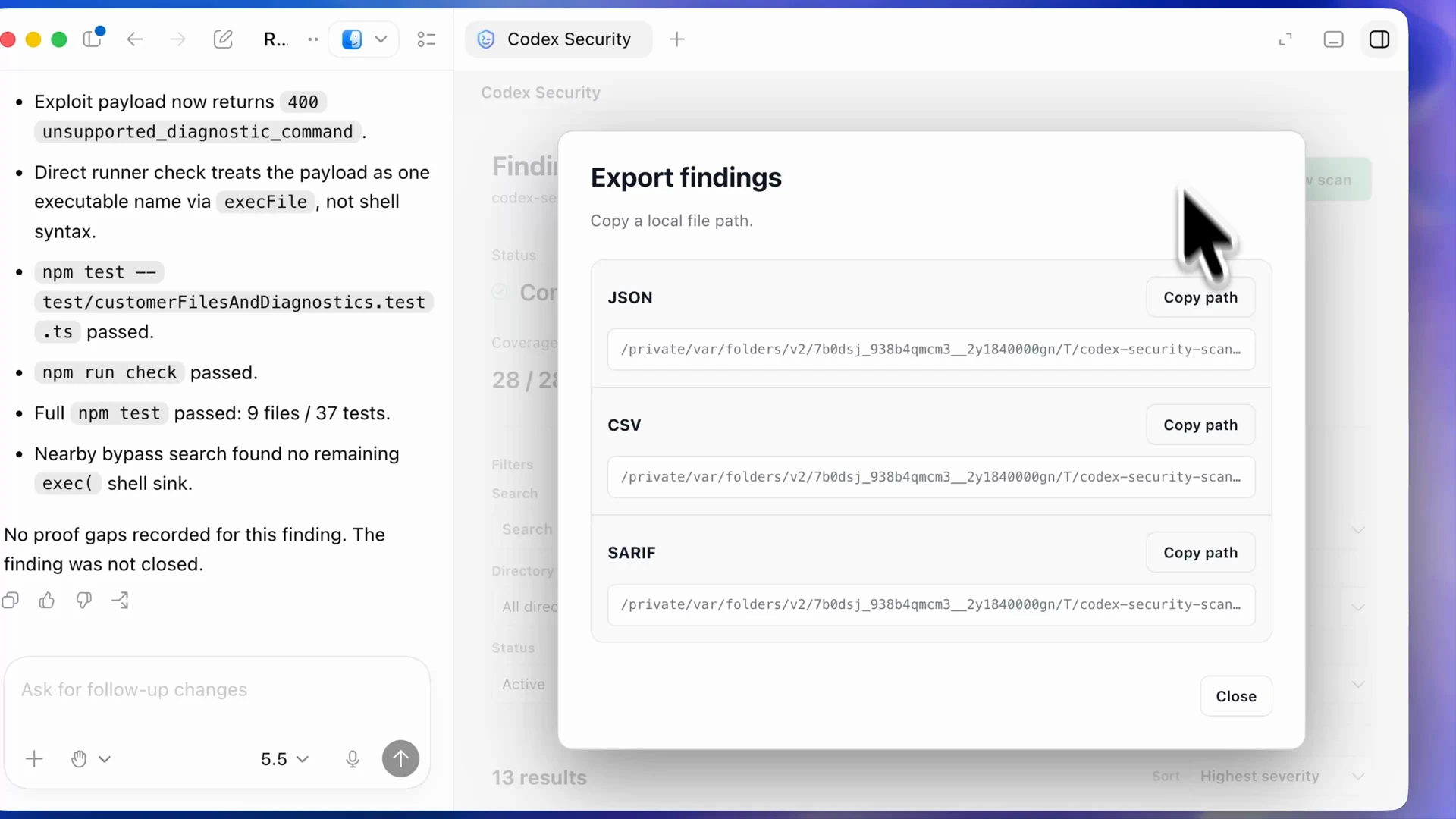
导出可移植工件
Section titled “导出可移植工件”打开已完成的发现工作区,选择 Export,然后选择一种格式:
| 格式 | 用途 |
|---|---|
| JSON | 保留已封存的结构化发现,供工具和脚本使用。 |
| CSV | 在电子表格中查看发现和当前的本地分诊状态。 |
| SARIF | 将发现发送到支持 SARIF 交换格式的工具。 |
选择 Export findings,并使用返回的工件路径。当其他工具需要完整的扫描上下文,而不仅仅是仅包含发现的投影时,请将原始的 scan-manifest.json、findings.json 和 coverage.json 放在一起。
将已完成的发现导出为 JSON、CSV 或 SARIF,供下游审查和工具使用。
跟踪选定的发现
Section titled “跟踪选定的发现”$codex-security:track-findings 工作流接受来自一次已封存扫描的一个已验证发现,或明确选定的最多 25 个发现,用于 issue 跟踪。GitHub Security Advisory 草稿一次只能接受一个发现。一次运行使用一个提供商和一个目标。
对于 Linear,请发送类似以下内容的提示:
Use $codex-security:track-findings to prepare finding [finding ID] from[completed scan directory] for the Linear team [team] and project [project, ifany]. Check for duplicates and show me the exact issue title, body, metadata,and destination. Do not create or update anything until I approve that payload.对于 GitHub issue,请发送:
Use $codex-security:track-findings to prepare finding [finding ID] from[completed scan directory] for GitHub repository [owner/repository]. Check openand closed issues for duplicates and show me the exact issue title, body,metadata, repository visibility, and authenticated transport. Do not create orupdate anything until I approve that payload.对于 Jira,请发送:
Use $codex-security:track-findings to prepare finding [finding ID] from[completed scan directory] for Jira project [project key] as [issue type].Check for duplicates and show me the exact issue summary, description,metadata, and destination. Do not create or update anything until I approvethat payload.Jira 跟踪需要 Codex 中的 Atlassian Rovo 插件。重新使用 issue 需要读取权限;创建或更新 issue 需要读取和写入权限。
对于私有的 GitHub Security Advisory 草稿,请发送:
Use $codex-security:track-findings to prepare finding [finding ID] from[completed scan directory] as a private draft GitHub Security Advisory in[owner/repository]. Verify the sealed source revision, repository, affectedpaths, package metadata, and duplicate state. Show me the exact advisorypayload, authenticated GitHub CLI identity, and disclosure warnings. Do notcreate anything until I approve that payload.草稿公告要求来自已封存的 git_revision 扫描中的一个发现、经过验证的公开规范源代码仓库以及管理员访问权限。该工作流不会批量处理、更新、发布或关闭公告。如果源代码不满足这些要求,请使用已批准的私有 issue 目标。
审查拟写入的内容
Section titled “审查拟写入的内容”- 确认发现 ID 和指纹来自预期的已封存扫描。
- 确认提供商、确切的 Linear 团队、GitHub 仓库、Jira 项目或公告仓库,以及目标的实时可见性。
- 审查重复项结果:
create、reuse、update或blocked。 - 阅读完整的拟定标题、正文、源位置和提供商元数据。移除目标不应公开的漏洞利用详情或内部证据。
- 仅批准该确切载荷。目标、可见性、发现集合或正文发生变化时,需要生成新的预览。
敏感发现应发送到私有目标。在内部或公开的 GitHub 仓库中创建 issue 需要明确的可见性警告,并批准完整内容。将草稿公告描述视为最终可能公开的内容,在批准前移除凭据、私有证据和不必要的漏洞利用详情。
验证已跟踪的项目
Section titled “验证已跟踪的项目”批准后,Codex 会重新验证已封存的来源、目标、访问权限和重复项状态。它会按顺序处理批次,并在首次遇到不确定结果时停止。只有在 Codex 读回确切的 issue,并验证其绑定标识符和内容后,创建、更新或重新使用操作才算完成。
请将返回的规范 issue 或公告 URL 与你的分诊记录一起保存。当所有者接受该项目进行修复时,继续阅读修复并验证发现。